Redox devlog 2: it's been a minute
The GitHub repo, and the crate.
cargo install redox-editor
This is a long one. Grab a snack.

Well, that escalated
The last Redox devlog was on February 20. That was not long ago on a calendar, but it was roughly eight geological epochs ago in "opening Helix source files at 1:00 a.m. and muttering about text objects" time.
I also finished my computer science degree a few days ago. Redox began as my capstone project, so it no longer has to compete with assignments and exams.
Naturally, instead of resting, I made the terminal editor more complicated.
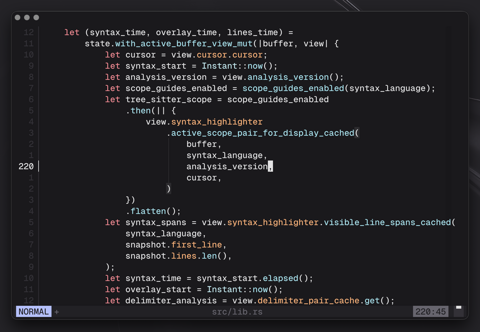
Redox has gone from "this can edit a file" to something that behaves like a modal editor. It now has multiple buffers, an Oil-inspired file explorer, three visual modes, undo and redo, registers, system clipboard integration, search, and text objects. It also has Tree-sitter syntax highlighting, scope guides, delimiter highlighting, smart indentation, background analysis, and much better performance. Then there is :rain, which is best discovered by trying it.
I have been busy. The devlog has not.
Let's fix that.
From version 0.2.0 to 0.5.0
The previous post covered the 0.2.0 release. Since then, Redox has moved through:
v0.3.0v0.3.1v0.3.2v0.4.0v0.4.1v0.5.0
A diff from v0.2.0 to the current version gives the scale of the work:
67 files changed, 15724 insertions(+), 1729 deletions(-)
That is not a normal devlog gap. Apart from performance work, the core architecture from the last post survived. Redox has pushed those boundaries much harder since then, and they held up.
Renaming the workspace
Last time, the workspace looked like this:
crates/
├── editor_core/
└── editor_tui/
I renamed the crates and simplified the package structure:
redox/
├── src/
│   └── main.rs
├── crates/
│   ├── redox-core/
│   └── redox-tui/
The root crate is now redox-editor. It is a thin wrapper that publishes the installable binary:
cargo install redox-editor
Don't worry, the binary itself is still called redox.
The internal split still follows the original design:
redox-coreowns text buffers, positions, motions, selections, text objects, search, and sessions. It has no UI dependency.redox-tuiowns the MinUI runtime, input mapping, rendering, popups, widgets, syntax highlighting, cursor projection, and terminal interaction.
The split matters more now that Redox has enough editor behaviour to make one enormous "state blob of destiny" emotionally harmful.
Multi-buffer sessions
Redox is no longer a single-buffer editor.
The core has an EditorSession that owns multiple buffers, tracks the active buffer, remembers most recently used ordering, and keeps file metadata separate from buffer contents.
That enables these commands:
:e <path>   # Open/switch buffer for a specified file path
:bn         # Go to the next buffer (MRU order)
:bnext      # Same thing, more verbose
:bp         # Go to the previous buffer (MRU order)
:bprev      # Same thing again
:ls         # List the currently open buffers, Vim-style
The session tracks stable buffer IDs, file-backed and UI buffers, dirty state, new files, open paths, navigation order, and loading state.
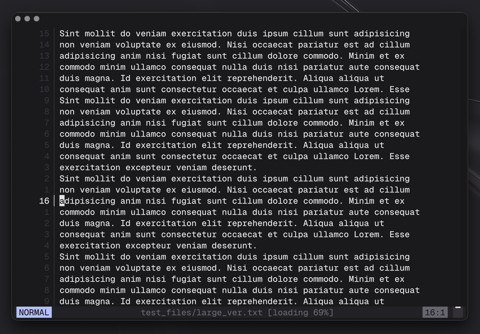
Loading state matters because Redox no longer has to read an entire file before displaying its first chunk.
The previous post had this note:
Redox currently slows down on files larger than about 1 MB.
That note led to one of the larger changes, incremental loading.
Incremental file loading
Files larger than 64 KB now use an incremental, UTF-8-safe loader.
Redox reads an initial chunk into the rope, displays it, and continues loading. The loader preserves UTF-8 boundaries, so a multi-byte character split across chunks does not become text confetti.
The active buffer has a load phase:
pub enum BufferLoadPhase {
    NotLoading,
    Loading,
    Complete,
    Failed,
}
The TUI can then pump loading based on the viewport and show loading progress in the status bar.
Redox blocks edits and saves until the active buffer finishes loading. Trying to edit forces the rest of the file to load first. Waiting is annoying, but editing half a file while the other half is still arriving is begging for corruption. Incremental loading is mainly for viewing large files. Sublime Text exists when I need to edit one.
Incremental loading is not glamorous, but neither is plumbing, and I remain a fan of indoor water.
A file explorer that tastes like Oil
Redox now has a file explorer, toggled with:
<space>e
:ex
:explorer
It is inspired by my favourite Neovim file explorer, oil.nvim. This means the directory is represented as an editable buffer rather than a separate tree widget.
File operations become text edits:
- edit a file name to rename it
- add a new line to create a file or directory
- delete a line to delete a file or directory
- write the explorer buffer to apply the changes
This feels natural in a modal editor and is also terrifying. "The user deleted a line" can mean "remove text from a buffer" or "recursively delete this directory from disk." Those actions have slightly different stakes.
The explorer therefore has a few safeguards:
- delete confirmation for destructive operations
- recursive directory deletion handling
- path sync for open buffers after renames/deletes
- hidden dirty buffers are protected
- cursor position is preserved where possible
- navigating to a parent directory reselects the directory you came from
One thing that Oil does that Redox currently doesn't is easy nested/file/creation.txt. In Oil, writing this as a line entry would automatically create a directory structure like:
nested/
└── file/
    └── creation.txt
Redox currently rejects that entry as an invalid file name. I plan to add nested creation because Oil's version is genuinely handy.
Visual mode exists now
Visual mode was "coming soon" in the last post. It has now arrived.
Redox supports all three forms:
v         visual mode
shift+v   visual line mode
ctrl+v    visual block mode
The visual modes support:
- yanking
- deleting
- changing
- replacing
- indentation
- outdentation
- moving selected lines with
shift+j/shift+k - yanking to the system clipboard with
<space>y
Character, line, and block selections use shared edit-plan logic in redox-core. The TUI asks the core for a plan and applies it.
Selections became data instead of a pile of special cases wearing a trench coat.
Registers, paste, undo, and redo
Redox now has a private register, plus basic system clipboard support via MinUI.
Normal paste works:
p   Paste after/below cursor
P   Paste above cursor
Pasting from the system clipboard works with:
<space>p
Visual selections can be yanked to the system clipboard with:
<space>y
There is also undo/redo:
u
ctrl+r
The undo model is deliberately simple and inefficient. Redox takes a full buffer snapshot for each edit, then restores snapshots during undo and redo. It uses more memory than a system that stores only the changes.
A change-based system must be completely accurate or it risks corrupting data, and I did not have time to make one safe before the capstone deadline. Full snapshots are clumsy but reliable. Most edited files are under 64 KB, and Ropey's structural overhead is about 10 to 15 per cent of the file size. Unless you are working on a Cold War computer, it should be fine.
I still plan to add change-based tracking and a stored undo tree. The current version is basic, but it makes edits reversible.
Repeated insert-mode typing becomes one undo step. Typing a word and pressing u removes the word, not one sad little character at a time.
The motion system grew up
The input mapper from the last post was already a tiny state machine for counts and gg, but it's eaten a few protein bars since then.
It now tracks:
- pending key sequences
- count prefixes
- pending operators
- pending text object scopes
- pending
f/tsearch motions - pending replace actions
This enables Vim-like commands:
dd    Delete full line
yy    Yank full line
cc    Change full line
d$    Delete from cursor to end of line
D     Alias for the same thing ↑
diw   Delete in word
daw   Delete around word
ci"   Change in quotes
ca}   Change around braces
dap   Delete around paragraph
...
Input mapping still produces high-level actions instead of editing text directly.
For example:
InputAction::OperateTarget {
    operator,
    target,
}
The target might be a motion:
OperatorTarget::Motion {
    motion: Motion::LineEnd,
    count,
}
Or it might be a text object:
OperatorTarget::TextObject(TextObjectSpec {
    scope,
    kind,
    count,
})
That separation makes new behaviour easier to add without turning the input layer into a haunted switch statement.
I mean, it is still a switch statement. It is just less haunted.
Text objects
Redox now supports a first round of text objects:
iw   inner word
aw   around word
iW   inner big word
aW   around big word
ip   inner paragraph
ap   around paragraph
i"   inner double quotes
a"   around double quotes
i'   inner single quotes
a'   around single quotes
i`   inner backticks
a`   around backticks
i(   inner parentheses
a(   around parentheses
i[   inner brackets
a[   around brackets
i{   inner braces
a{   around braces
The core resolves each object into an edit plan containing:
- the ranges to delete
- the text to yank
- the register kind
- whether the operation is char-wise or line-wise
Delete, change, yank, and visual selection all share the same target resolution.
For example, ci" and visual i" should agree about what "inside this string" means. If they do not, the editor starts to feel haunted again, and we are trying to keep the haunting budget under control.
Search
Redox now has local search.
Start a search with:
/
Repeat it with:
ctrl+n   Jump to next instance
ctrl+p   Jump to previous instance
Redox also has same-line search motions:
f<char>   "Find" (up to the specified char, inclusive)
t<char>   "To" (up to the specified char, exclusive)
Those motions also work as operator targets:
df,   Delete to comma (also deletes the comma)
dt)   Delete to closing parentheses (does not delete the parentheses)
Editor state caches search results and the renderer highlights them. Moving the cursor hides the highlights but keeps the query, so repeat search still works.
redox-core scans Ropey chunks without flattening the buffer into one string. The first search implementation technically worked, but with about as much enthusiasm as I had by the end of the semester.
Syntax highlighting
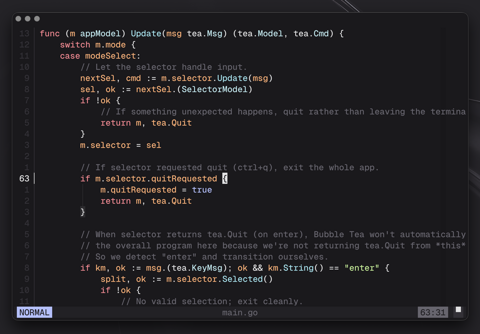
Tree-sitter syntax highlighting is the flashiest change. The first version supported only Rust. The current version covers the languages I use:
- Rust
- Markdown
- C
- C++
- Go
- Lua
- Python
- HTML
- CSS
- JavaScript
- TypeScript
- TSX
- JSON
- TOML
- YAML
I will add a few languages later, but I want to limit dependencies and keep install times reasonable. If Redox lacks a parser you need, its Tree-sitter modules provide a small pattern to copy in a fork.
A fallback highlighter handles files without a configured Tree-sitter parser. It recognizes comments, strings, numbers, keywords, and function-like tokens.
Each language has its own configuration module rather than another branch in one large function. A module can define:
- grammar
- highlight queries
- capture mapping
- role refinement
- optional inline grammar support
- scope node behaviour
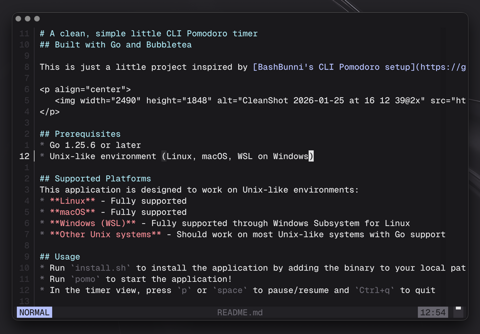
I use Markdown for notes, so its highlighter has custom rules for links, frontmatter, list markers, and inline emphasis.
The theme
I use this colour scheme in Ghostty, Neovim, Zed, this website, and now Redox. The repetition is intentional.
Comments, relative line numbers, scope overlays, the colour column, and most of the statusline use dim grey. They remain readable without competing with the text. Each statusline mode has a distinct colour that I can identify in my peripheral vision.
Basic text uses a dim white with a slight blue tint, 0xE2E2E3, to reduce contrast against the background. I've spent an unreasonable amount of time tuning these colours, and I love the result.
Background analysis
Syntax highlighting and delimiter analysis can get expensive, especially as files grow, so Redox now has a background analysis worker thread.
The editor requests analysis for a buffer and version. The worker computes:
- syntax highlight cache
- delimiter analysis
The request channel keeps only the latest pending request. If the user types quickly, Redox discards obsolete intermediate versions and analyzes the newest one. I would like to adopt this behaviour personally.
Each result includes its buffer and version, so Redox can discard stale work. Otherwise, old delimiter highlights could briefly appear on new text.
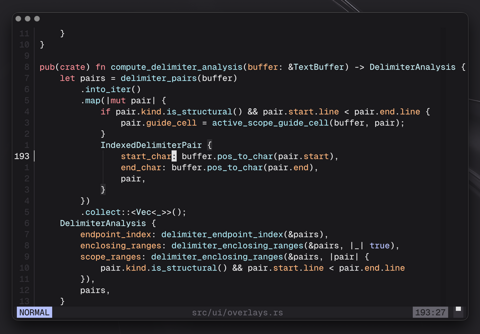
Delimiter highlighting and scope guides
Redox now highlights matching delimiter pairs:
- parentheses
- brackets
- braces
- quotes
- backticks
It also draws scope guide lines for active multi-line structures. This is another feature inspired by an existing Neovim plugin, mini.indentscope.
This began as delimiter scanning. Redox now uses Tree-sitter scope information when available and manual delimiter analysis elsewhere. The syntax pass identifies the active structure, then delimiter analysis maps it to the visible guide column.
Redox draws a guide only for the scope around the cursor instead of every indentation level. Full indentation guides clutter nested code. I usually care about the current scope, so that is the one Redox shows.
Smart indentation
Redox now adjusts indentation for newline and open-line commands such as enter, o, and O. It also preserves indentation when moving a selection with shift+j or shift+k.
The indentation system uses language-aware syntax information when possible, and falls back where needed.
It handles delimiter splitting like this:
fn main() {
    |
}
The same code handles supported quote and backtick cases. Markdown gets separate list-continuation rules. These details save keystrokes on nearly every new line.
Rendering and performance
Much of the work since the last post has targeted performance:
- incremental file loading
- viewport-driven loading
- long-line cursor fast paths
- reduced per-frame allocations
- optimized visual line movement
- optimized undo/redo snapshots
- optimized dirty tracking
- chunk-based rope search
- optimized delimiter pair calculation
- cached syntax rendering paths
- explicit frame budget targeting
A :perf popup shows where the editor spends each frame.
The editor loop targets 60 FPS, with a lower target when idle. Redox also tracks frame timing so expensive paths are easier to notice.
Clean architecture does not make an editor responsive. Hot paths still feel awful when they allocate, scan, or render too much. Even an occasional dropped frame is easy to notice while typing.
Correctness is table stakes. Responsiveness is the thing your hands actually notice.
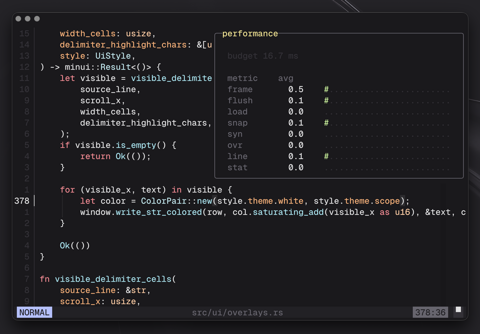
| Metric | Description |
|---|---|
| frame | Total frame time from start to finish |
| flush | Terminal output flushing time |
| load | File content loading/pumping time |
| snap | Buffer snapshot creation time |
| syn | Syntax highlight processing time |
| ovr | Overlay rendering time |
| line | Line drawing and rendering time |
| stat | Status bar rendering time |
| input | Input processing time |
| oth | Other miscellaneous operations |
The budget value at the top is 16.7 ms, the target frame time for 60 frames per second.
UI polish
The visible changes include:
- improved status bar styling
- relative line numbers
- a subtle colour column at column 80
- a tiny minimap/scroll progress indicator
- popup background dimming
- improved command mode popup
- an
:aboutscreen - a
:perfscreen
The smaller changes matter just as much:
- popups have better size guards on tiny terminals
- command mode moved into a popup inspired by noice.nvim
- popup backgrounds dim the editor behind them
- ephemeral status messages clear more predictably
escandctrl+cnow cancel popups/modes more consistently- normal-mode cursor positioning clamps to the last non-whitespace character on non-empty lines
The secret rain button
There is a :rain command.
I am not going to over-explain it.
Some features happen after you stare at terminal rendering code for too long and the terminal starts staring back. This one was inspired by cellular-automaton.nvim. You can now break your code in more ways than one. Press escape or ctrl+c to restore the buffer.
Testing, testing
The test suite has also grown.
At the time of writing, the workspace test run passes:
108 redox-core tests
282 redox-tui tests
390 total tests
The tests cover:
- buffer editing
- selections
- visual modes
- text objects
- search
- motion parsing
- multi-buffer sessions
- file loading
- explorer operations
- syntax highlighting
- delimiter analysis
- scope guides
- status bar behaviour
- popup wrapping
- rendering fast paths
- undo/redo behaviour
- smart indentation
What works now
Redox can now:
- open files directly
- open full directories with
redox .orredox <path> - multi-buffer editing
- buffer switching with
:bn,:bp, and:ls - file explorer with editable directory operations
- normal, insert, command, search, visual, visual line, and visual block modes
- private register yanks/deletes/pastes
- system clipboard yank/paste support
- undo/redo
- slash search and repeat search
f/tcharacter search motions- common motions like
h/j/k/l,w/b/e,gg,G,0,_,$ - operator commands like
dd,yy,cc,D,d$,diw,ci",dap - Tree-sitter syntax highlighting for a bunch of languages
- fallback syntax highlighting for unsupported languages
- delimiter pair highlighting
- active scope guides
- smart indentation
- relative line numbers
- colour column
- performance popup
- about popup
- incremental file loading
Last time, Redox was basically functional. Now its missing features are starting to look like editor design decisions instead of obvious holes.
That is a dangerous stage. This is where opinions begin to form.
Still simple on purpose
There are still plenty of intentionally simple pieces.
Redox still does not have:
- an undo tree UI
- persistent undo history
- fuzzy file finding
- project-wide grep
- LSP support
- tabs/windows/splits
- configuration
- macros
- command history
- regex search
- syntax-aware editing beyond indentation/highlighting
- a plugin system
Most of those are planned. Mouse support probably is not. MinUI can track clicks, drags, and cursor position, but I disable the mouse in Neovim and want Redox to stay keyboard-first.
Fuzzy finding, stronger search, more Vim motions, and an undo tree are next. Performance and correctness still take priority over adding more commands.
Roadmap
| Stage | Status | Main focus | Highlights |
|---|---|---|---|
| Core editor foundation | Done | Editing model | Rope buffer, positions, motions, selections, undo/redo, file I/O |
| Language awareness | Done | Syntax and structure | Tree-sitter highlighting, delimiter pairs, scope guides, smart indentation |
| Real editor workflows | Mostly done | Daily editing flow | Multi-buffer sessions, explorer, visual modes, registers, search, text objects |
| Performance and scale | Done for now | Large files and responsiveness | Incremental loading, cached rendering, background analysis, search optimizations |
| Power features | Planned | Editor depth | Undo tree UI, fuzzy finding, grep, more motions, LSP support, Git integration |
Closing thoughts
This project started as a capstone with one question:
Can I build a text editor with a clean architecture and enough functionality to prove the design?
The last release answered that question. Now I am asking a harder one:
Can I keep growing this into an editor that feels good enough that I actually want to use it?
I am already close. Compared with my Neovim configuration, I mainly miss fuzzy finding, LSP support, and Git integration.
The architecture now supports multiple buffers, background analysis, syntax-aware features, visual editing, file operations, and enough Vim grammar to feel blazingly fast. It is no longer just carrying an MVP.
Redox is much more capable than the little terminal editor from the first post. I love working on it, and finishing my degree gives me more time to keep going.
It has organs now.
Possibly too many.
But they are mostly passing tests.